 mc_rtc
mc_rtc
mc_rtc
mc_rtc::Configuration general purpose configurationmc_convex_visualization is a tool that allows you to visualize the convexes of a robot in mc_rtc GUI or in RViZ. This is a sub-tool of mc_robot_visualization provided for convenience.
The tool is launched as follows:
$ mc_convex_visualization[_ros] JVRC1
Note that mc_convex_visualization only publishes in mc_rtc gui, while mc_convex_visualization_ros publishes in both mc_rtc gui and ros (RViZ).
If you installed from packages, the ros-free version is provided by mc-rtc-utils while the ros version is provided by ros-<distro>-mc-rtc-utils.
The arguments to the program should be the same as you would use as a MainRobot entry. It can also handle aliases. For example:
# Specify a vector of arguments
$ mc_convex_visualization env `rospack find mc_env_description` ground
# Or an alias
$ mc_convex_visualization env/ground
After launching an mc_rtc GUI, it should look like this:
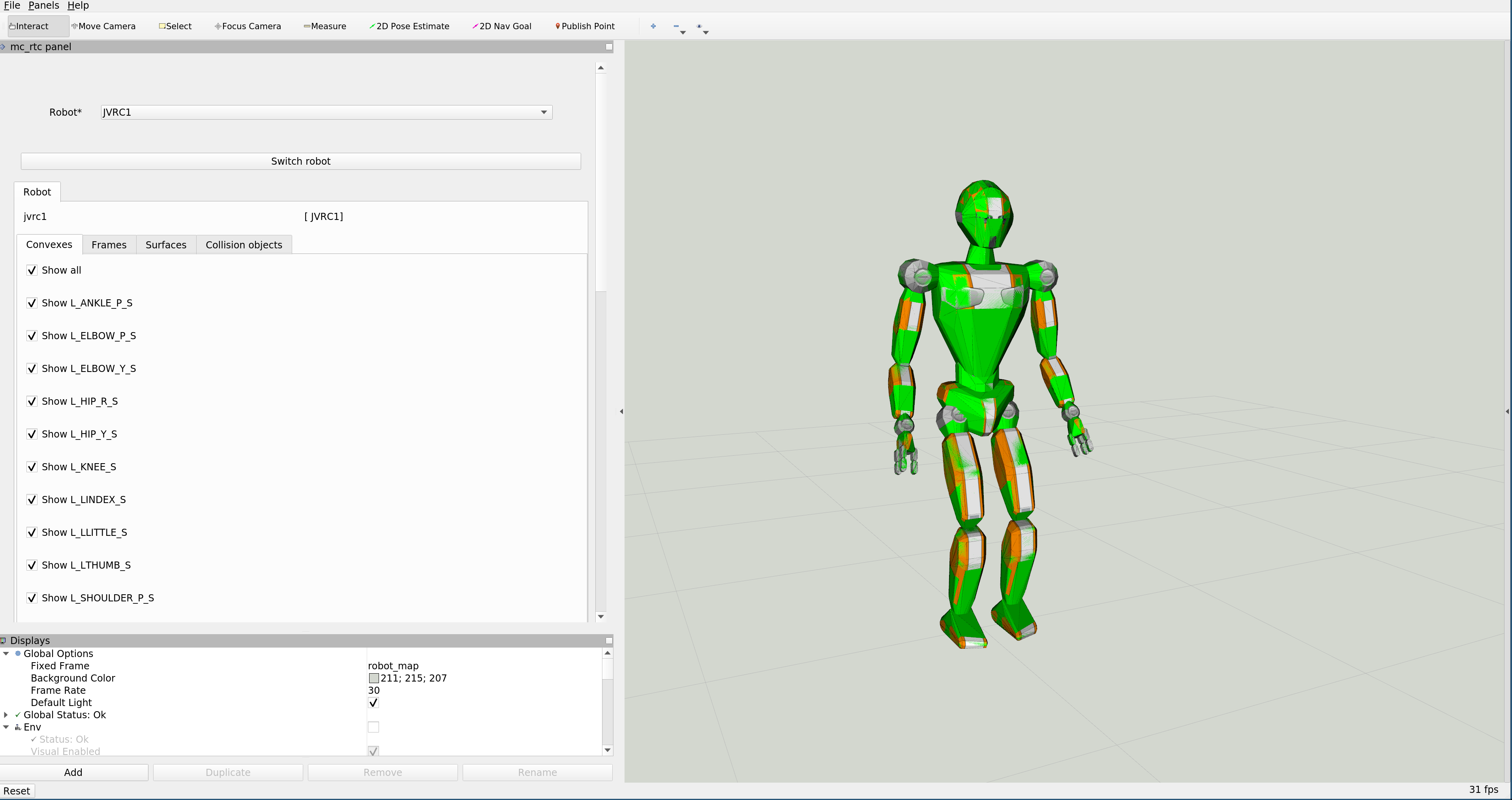
You can easily select which convexes to display through the interface.